- A server or a spare machine. A 1 vCPU / 512 MB box is plenty — nginx serves files, nothing more.
- Docker 24+ with Compose v2 (recommended), or nginx 1.24+ installed directly.
- Outbound HTTPS from your visitors’ browsers to Firebase, Google sign-in, Cloudflare Turnstile and the donation widget. Nothing is bundled locally.
- A copy of the TextNexus site files. The kit ships the server configs; the pages themselves come from the TextNexus source. If you do not have them, ask the team.
- Optional: a domain name and a TLS certificate for the last step. The site works fine on
http://localhost:8080without either.
 Nexus Self-host
Public kit on GitHub ↗
Run Nexus on your own server.
The site is a static front end: HTML, CSS and JavaScript that talk to Firebase straight from the browser. There is no build step and no application server. This guide takes you from an empty server to https://nexus.example.com with Docker and HTTPS, and it names every file you touch along the way.
- StaticNo build, no database server
- ~5 minDocker Compose or nginx
- MITSame licence as TextNexus
The public kit is the server config plus this guide.
It lives at github.com/wwebsitesystem-stack/textnexus-self-host.
The site files themselves stay in the TextNexus source; copy the kit’s
Self hosting folder into the root of your copy of those files, then follow
the steps below. No secrets are in the kit — only the public Firebase web key that
every browser already downloads.
Before you start
What you need
You do not need Node, PHP, a database container or a build tool. You do need a machine that can run a web server and reach the services the browser uses.
The walkthrough
Seven steps to your own Nexus
Every command assumes you are in the root of the site files, the folder that contains index.html and the Self hosting directory.
-
Download the public kit
Clone the repository, or open it on GitHub and choose Code → Download ZIP. It contains the Dockerfile, the Compose file, the nginx server block and the self-hosting README.
Copy the
Self hostingfolder into the root of your TextNexus site files. That is the only file move in this guide.Terminalgit clone https://github.com/wwebsitesystem-stack/textnexus-self-host.git cp -R textnexus-self-host/Self\ hosting /path/to/your/textnexus/site # the result should look like this ls # index.html home.html Style.css Self hosting ...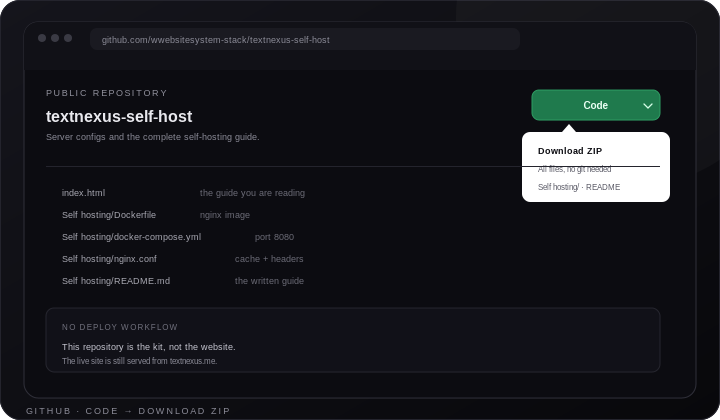
The public kit: server config plus the complete guide. -
Start it with Docker
The Compose file builds the image from the site root, so run it from the folder that holds
index.html. The first build downloads nginx and copies your site files into the image; later starts take a second.Terminal · site rootdocker compose -f "Self hosting/docker-compose.yml" up -d --build # stop it again docker compose -f "Self hosting/docker-compose.yml" downThe container is named
textnexus-siteand publishes port 8080. It restarts itself after a reboot unless you stop it.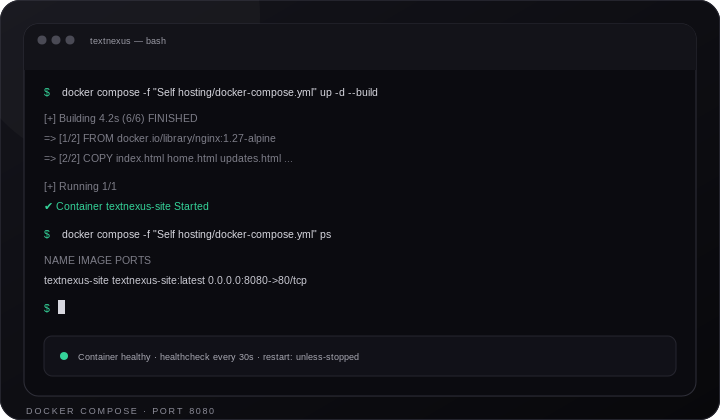
One Compose command builds and starts the site. Without Docker: plain nginx
Copy the site files into a web root, install the server block, and reload nginx. This is the same configuration the container uses.
Terminal · Debian / Ubuntusudo mkdir -p /var/www/textnexus sudo cp -R *.html *.css *.js *.json *.svg *.png *.webmanifest *.xml *.txt \ media games ghostlink-games /var/www/textnexus/ sudo cp "Self hosting/nginx.conf" /etc/nginx/sites-available/textnexus sudo ln -s /etc/nginx/sites-available/textnexus /etc/nginx/sites-enabled/ sudo nginx -t && sudo systemctl reload nginxThe nginx block points at
/usr/share/nginx/htmlbecause that is where the container keeps the files. For a host install, change itsrootline to/var/www/textnexus. -
Open it in a browser
Go to http://localhost:8080. The boot animation runs and the workspace loads exactly as it does on textnexus.me.
From another machine, replace
localhostwith the server’s address — the port is published on all interfaces, so the page is reachable as long as your firewall allows 8080.Remote box? If the page times out, open port 8080 in the firewall (or an SSH tunnel:ssh -L 8080:127.0.0.1:8080 user@server). Never expose it to the internet over plain HTTP — do step 06 first.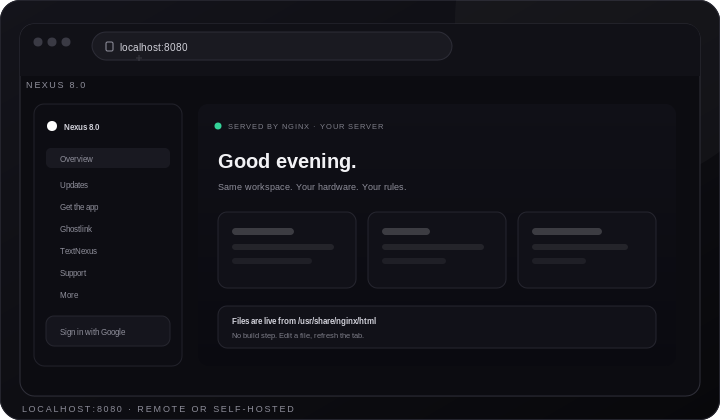
The same site, now served from your machine. -
Point it at Firebase
The pages talk to Firebase directly; nginx never sees the data. The project id and web API key are already written into the pages, so the only server-side work is publishing the Realtime Database rules.
Terminal · Firebase CLIfirebase login firebase deploy --only database \ --project nexus-web-development-officialOr paste
database.rules.jsoninto Realtime Database → Rules in the Firebase console and press Publish.Then allow your new address to sign users in: Authentication → Settings → Authorized domains → Add domain. Add
localhostwhile testing and your real hostname before going live. If the Google consent screen is still in Testing, add test accounts under Audience → Test users.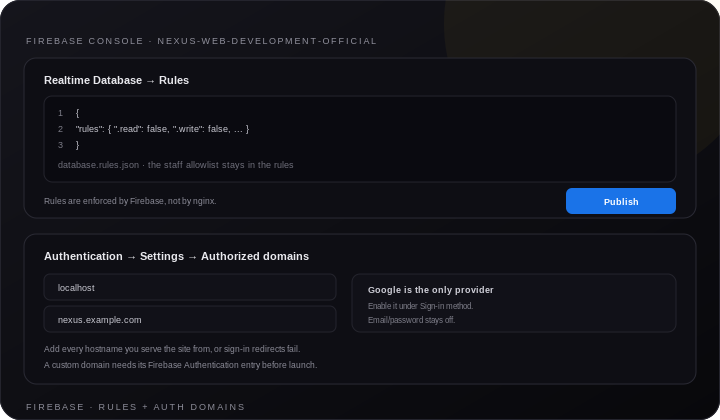
Two console screens: publish the rules, allow your hostname. Using your own Firebase project? Replace thefirebaseConfigblock in the site’s pages with your project’s web config, publish your own rules, and update the project id in the deploy command. The public web key is not a secret; the rules are the boundary. -
Give it a domain and HTTPS
Put a TLS-terminating proxy in front of the container. Caddy fetches a certificate on its own if your DNS already points at the server:
Caddyfilenexus.example.com { reverse_proxy 127.0.0.1:8080 }Then
sudo systemctl reload caddy. With nginx and certbot, proxy ports 80/443 to127.0.0.1:8080and runcertbot --nginx. A Cloudflare Tunnel also works and needs no open ports.Finally, add
nexus.example.comto Firebase’s authorized domains (step 04). HTTPS is not optional: Firebase sign-in and the service worker both expect a secure origin.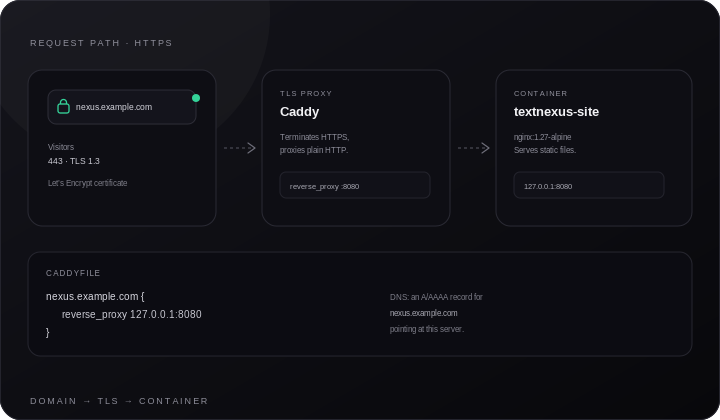
A TLS proxy keeps the container private and gives you HTTPS. -
Update when the site changes
The image carries a copy of the files, so an update is a pull and a rebuild. Rebuilds are cached, so only changed layers are replaced.
Terminal · site rootgit pull docker compose -f "Self hosting/docker-compose.yml" up -d --build # keep the old image around for a quick rollback docker image ls textnexus-siteIf you host with plain nginx, copy the changed files into
/var/www/textnexusand reload nginx. HTML is servedno-cache, so visitors pick up a new page on the next request; CSS and JS are cached for a day, which is why the site bumps its?v=query strings on release. -
Check the final result
- The boot screen appears and the workspace loads — no blank page, no console errors about missing CSS or JS.
- Sign in with Google completes and returns to your domain (it is in Firebase’s authorized domains).
- Opening
/404.htmlfor a made-up path shows the branded not-found page with a real 404 status. curl -I https://nexus.example.comanswers 200 and your browser shows the padlock.- You can still reach
https://textnexus.me— the live site is independent of your copy.
Troubleshooting
When something looks wrong
The five failures that account for almost every stuck self-host install.
/textnexus.html returns 404
Server filesystems are case-sensitive and the real file is TextNexus.html. Link to it with the exact casing. The same applies to Style.css.
Pages load but data is empty and the console says PERMISSION_DENIED
The published database rules do not allow that read. Deploy database.rules.json (step 04), then confirm the user is signed in. nginx does not apply Firebase rules — Firebase does.
Ghostlink or Jeoweb misbehave
Both register a service worker and load remote scripts. Serve the site over HTTP(S) from a single origin, then hard-reload once to drop a stale worker. A quick python3 -m http.server is not enough: it sends the wrong MIME types for some assets.
Feedback or registration forms return 404
Those forms post to /api/*, which Cloudflare Pages Functions run on textnexus.me. The static nginx image does not execute those Functions, so the endpoints return 404 on a self-hosted copy. Host the Functions separately or point the forms at your own endpoint; the Firebase-backed pages still work.
Ads, Turnstile or the donation widget never appear
An ad blocker or a filtered network will do that. The turnstile gate is client-side only; the API endpoints keep their own server-side validation and rate limits. Nothing breaks in the static copy.